Last modified: Jan 31 2026 at 10:09 PM • 5 mins read
Understanding Dropout
Table of contents
- Introduction
- Why Dropout Works: Two Key Intuitions
- Dropout as Adaptive L2 Regularization
- Layer-Specific Dropout Rates
- Hyperparameter Tuning Trade-offs
- When to Use Dropout
- Implementation Gotchas
- Key Takeaways
Introduction
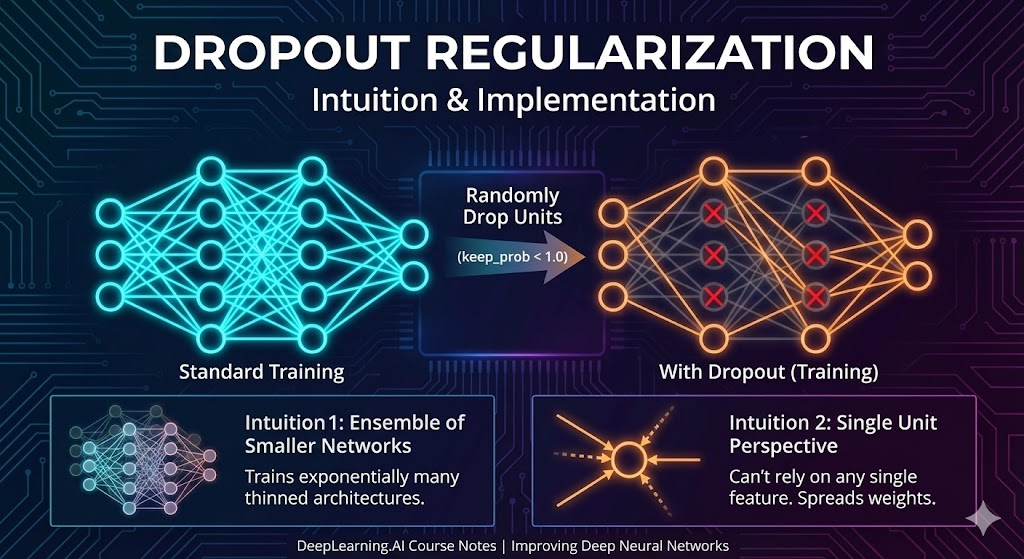
Dropout randomly eliminates neurons during training—but why does this seemingly counterintuitive technique work so effectively as a regularizer? Let’s explore the intuitions behind dropout’s success.
Why Dropout Works: Two Key Intuitions
Intuition 1: Training with Smaller Networks
The Effect: Dropout randomly knocks out units in your network on each iteration, forcing the network to work with a smaller, “thinned” architecture.
Why It Helps: Training with smaller neural networks has a natural regularizing effect—smaller networks have less capacity to memorize training data and are forced to learn more generalizable patterns.
Intuition 2: Preventing Feature Co-Adaptation
Let’s examine dropout from the perspective of a single neuron:
![A handwritten neural network diagram showing the effect of dropout. Left side shows a simple 4-input neuron with inputs x1, x2, x3, x4 connected to a central node, with two crossed-out red connections indicating randomly dropped units. An arrow points down to a graph labeled Downside: J showing a smooth decreasing curve representing the cost function versus number of iterations. Right side displays a deeper neural network architecture with three input features (x1, x2, x3) feeding into multiple hidden layers of neurons. Several neurons are marked with red X symbols showing dropped units. Blue annotations show keep-prob values (0.9, 0.5, 0.7) and weight matrices (W[1], W[2], W[3]) with their dimensions. Arrows indicate the flow from inputs through hidden layers to output ŷ. The handwritten notes emphasize Computer Vision text at top, Downside: J on the left graph, and various probability and weight values throughout. Created by Andrew Ng for DeepLearning.AI course materials](/assets/images/deep-learning/improving-deep-neural-networks/week-1/understanding-dropout-handwritten.png)
The Problem Without Dropout:
- A neuron with 4 inputs might learn to rely heavily on just one or two features
- This creates fragile, specialized connections that don’t generalize well
How Dropout Solves This:
- Random Input Elimination: Any input to this neuron can be randomly eliminated during training
- Forced Redundancy: The neuron cannot rely on any single feature because that feature might disappear
- Weight Spreading: The neuron is motivated to distribute its weights more evenly across all inputs
- Regularization Effect: Spreading weights reduces the squared norm of weights, similar to L2 regularization
Key Insight: Dropout prevents neurons from co-adapting too much on specific features, forcing them to learn more robust representations.
Dropout as Adaptive L2 Regularization
Dropout can be formally shown to be an adaptive form of L2 regularization, with some important differences:
| Aspect | L2 Regularization | Dropout |
|---|---|---|
| Weight Penalty | Uniform across all weights | Adaptive based on activation magnitude |
| Mechanism | Penalize large weights directly | Force weight spreading indirectly |
| Adaptivity | Fixed λ parameter | Adapts to scale of different inputs |
The key difference: Dropout’s L2-like penalty varies depending on the size of the activations being multiplied by each weight, making it more adaptive to the data.
Layer-Specific Dropout Rates
Different layers can use different keep_prob values based on their tendency to overfit.
Choosing Keep_Prob by Layer Size
Consider a network architecture: Input (3) → Hidden1 (7) → Hidden2 (7) → Hidden3 (3) → Hidden4 (2) → Output (1)
Weight Matrix Sizes:
- $W^{[1]}$: 7×3 (21 parameters)
- $W^{[2]}$: 7×7 (49 parameters) ← Largest matrix, most prone to overfitting
- $W^{[3]}$: 3×7 (21 parameters)
- $W^{[4]}$: 2×3 (6 parameters)
- $W^{[5]}$: 1×2 (2 parameters)
Recommended Keep_Prob Values:
keep_prob_1 = 1.0    # Layer 1: Small matrix, no dropout needed
keep_prob_2 = 0.5    # Layer 2: Largest matrix (7×7), aggressive dropout
keep_prob_3 = 0.7    # Layer 3: Medium matrix, moderate dropout
keep_prob_4 = 0.7    # Layer 4: Small matrix, light dropout
keep_prob_output = 1.0  # Output: No dropout
General Guidelines
Layers with MORE parameters → LOWER keep_prob (stronger dropout)
- More parameters = more capacity to overfit
- Apply dropout more aggressively
Layers with FEWER parameters → HIGHER keep_prob (weaker or no dropout)
- Less capacity to overfit
- May not need dropout at all
Input and Output Layer Considerations
Input Layer:
keep_prob = 1.0(most common) - no dropout- Or
keep_prob = 0.9(rarely) - very light dropout - Reasoning: You rarely want to eliminate input features randomly
Output Layer:
keep_prob = 1.0- never use dropout- Reasoning: You need deterministic outputs for predictions
Hyperparameter Tuning Trade-offs
Option 1: Layer-Specific Keep_Prob
# Different keep_prob for each layer
keep_prob = [1.0, 0.5, 0.7, 0.7, 1.0]
Pros: Maximum flexibility, can optimize each layer individually Cons: More hyperparameters to tune via cross-validation
Option 2: Selective Layer Dropout
# Dropout only on specific layers
keep_prob_layer2 = 0.5  # Only apply to layer 2
# All other layers: no dropout
Pros: Fewer hyperparameters (just one keep_prob) Cons: Less fine-grained control
Think of it like L2 regularization: Just as you can adjust λ to control regularization strength, you adjust keep_prob to control dropout strength per layer.
When to Use Dropout
Computer Vision: Almost Always
Why:
- Input sizes are huge (thousands of pixels)
- Almost never have enough data
- Overfitting is nearly guaranteed
- Computer vision researchers use dropout as default
Other Domains: Only When Overfitting
Rule: Dropout is a regularization technique—only use it if you’re actually overfitting.
Signs You Need Dropout:
- Training accuracy » validation accuracy
- Model performs well on training set but poorly on test set
- Large, complex network with limited data
Signs You Don’t Need Dropout:
- Training and validation accuracy are similar
- You have abundant data
- Model is relatively simple
Important: Don’t use dropout by default—use it as a tool to combat overfitting when needed.
Implementation Gotchas
Downside: Cost Function Monitoring
Problem: The cost function $J$ is no longer well-defined during training with dropout.
Why:
- You’re randomly eliminating neurons on each iteration
- The network architecture changes every iteration
- Hard to verify that $J$ is monotonically decreasing
Solution - Two-Phase Debugging:
# Phase 1: Debug without dropout
keep_prob = 1.0  # Turn off dropout
# Train and verify J decreases monotonically
# Plot cost function to ensure gradient descent works

# Phase 2: Train with dropout
keep_prob = 0.5  # Turn on dropout
# Hope no bugs were introduced
# Monitor validation performance instead of J
Best Practice:
- First, get your code working without dropout
- Verify cost function decreases properly
- Then add dropout and monitor validation metrics
- Use other debugging methods (validation accuracy, test performance) instead of plotting $J$
Key Takeaways
- Two Intuitions: Dropout works by training smaller networks and preventing feature co-adaptation
- Adaptive Regularization: Acts like adaptive L2 regularization based on activation scales
- Layer-Specific Rates: Use lower
keep_prob(stronger dropout) for layers with more parameters - Input/Output: Typically no dropout on input (
keep_prob ≈ 1.0) and never on output - Domain-Specific: Common in computer vision (always overfitting), less common elsewhere
- Use When Needed: Only apply dropout if you’re actually overfitting
- Debugging Challenge: Cost function monitoring is harder—debug without dropout first
- Hyperparameter Tuning: Balance between layer-specific flexibility and simplicity