Last modified: Jan 31 2026 at 10:09 PM • 6 mins read
Normalizing Inputs
Table of contents
- Introduction
- The Two-Step Normalization Process
- Critical Rule: Use Training Statistics for Test Set
- Why Normalization Speeds Up Training
- When to Normalize: Practical Guidelines
- Complete Workflow Example
- Key Takeaways
Introduction
Normalizing your inputs is one of the most effective techniques to speed up neural network training. This preprocessing step ensures all input features are on similar scales, making optimization much more efficient.
The Two-Step Normalization Process
Consider a training set with input features $x$ (for example, 2-dimensional features visualized in a scatter plot).
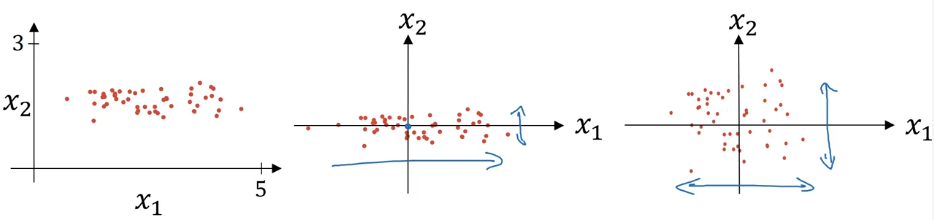
Step 1: Zero Out the Mean (Centering)
Goal: Shift all data so it’s centered around the origin
Formula:
\[\mu = \frac{1}{m} \sum_{i=1}^{m} x^{(i)}\] \[x := x - \mu\]Where:
- $\mu$ is a vector containing the mean of each feature
- $m$ is the number of training examples
- $x^{(i)}$ is the $i$-th training example
Effect: This moves the entire training set so it has zero mean.
import numpy as np

# Calculate mean
mu = np.mean(X_train, axis=0)  # Shape: (n_features,)

# Subtract mean from all examples
X_train_centered = X_train - mu
Step 2: Normalize the Variances (Scaling)
Goal: Scale features so they have similar ranges
Formula:
\[\sigma^2 = \frac{1}{m} \sum_{i=1}^{m} (x^{(i)})^2\] \[x := \frac{x}{\sigma}\]Where:
- $\sigma^2$ is a vector containing the variance of each feature (element-wise)
- $(x^{(i)})^2$ represents element-wise squaring
- Since we already subtracted the mean, this directly gives us the variance
Effect: Features $x_1$ and $x_2$ now both have variance equal to 1.
# Calculate standard deviation (after centering)
sigma = np.std(X_train_centered, axis=0)  # Shape: (n_features,)

# Normalize by standard deviation
X_train_normalized = X_train_centered / sigma
Complete Implementation:
def normalize_inputs(X_train, X_test):
    """
    Normalize training and test sets

    Args:
        X_train: Training data (m_train, n_features)
        X_test: Test data (m_test, n_features)

    Returns:
        X_train_norm, X_test_norm: Normalized datasets
    """
    # Step 1: Calculate mean and std from TRAINING data only
    mu = np.mean(X_train, axis=0)
    sigma = np.std(X_train, axis=0)

    # Step 2: Apply same transformation to both train and test
    X_train_norm = (X_train - mu) / sigma
    X_test_norm = (X_test - mu) / sigma

    return X_train_norm, X_test_norm
Critical Rule: Use Training Statistics for Test Set
Important: Always use the same $\mu$ and $\sigma$ (calculated from training data) to normalize both training and test sets.
Why?
- Training and test data must go through identical transformations
- If you calculate separate statistics for test data, you’re applying a different transformation
- This violates the assumption that train and test come from the same distribution
Correct Approach:
| Step | Training Set | Test Set |
|---|---|---|
| Calculate $\mu$ and $\sigma$ | ✅ From training data | ❌ Don’t calculate separately |
| Apply normalization | Use training $\mu$ and $\sigma$ | Use same training $\mu$ and $\sigma$ |
Why Normalization Speeds Up Training
The Problem: Elongated Cost Functions
When features are on very different scales, the cost function becomes distorted:
Example - Unnormalized Features:
- Feature $x_1$: ranges from 1 to 1,000
- Feature $x_2$: ranges from 0 to 1
Impact on Cost Function $J(w, b)$:
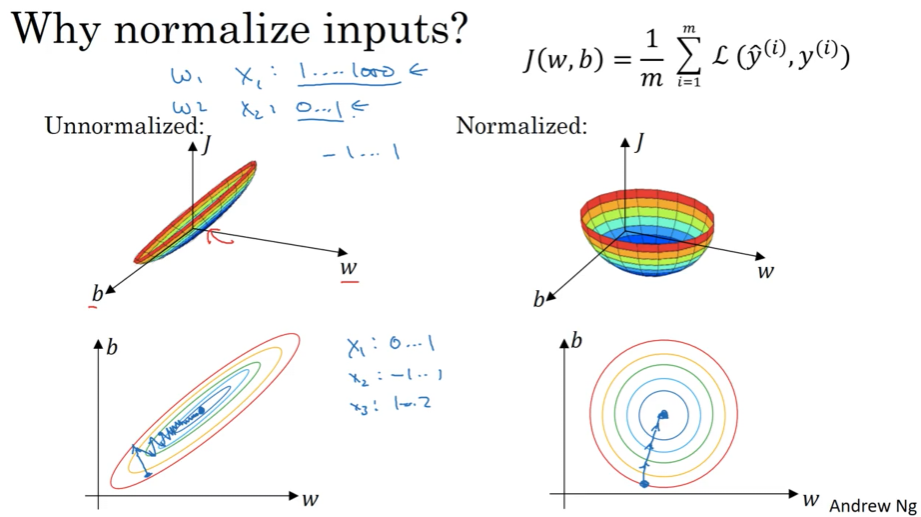
The contours become extremely elongated (like a stretched ellipse), because:
- Parameters $w_1$ and $w_2$ must compensate for vastly different input scales
- The cost function is much more sensitive to changes in $w_1$ than $w_2$
- Creates a “narrow valley” in the optimization landscape
The Solution: Spherical Cost Functions
After Normalization:
- All features roughly range from -1 to 1
- Features have similar variances (typically 1)
Result: Cost function contours become more spherical (circular) and symmetric.
Impact on Gradient Descent
| Aspect | Unnormalized Features | Normalized Features |
|---|---|---|
| Cost Function Shape | Elongated ellipse | Spherical/circular |
| Learning Rate | Must use very small rate | Can use larger rate |
| Convergence Path | Oscillates back and forth | Direct path to minimum |
| Number of Steps | Many iterations needed | Fewer iterations |
| Training Speed | Slow | Fast |
High-Dimensional Intuition
Note: In practice, $w$ is high-dimensional, so we can’t perfectly visualize this in 2D. But the key intuition holds: normalized features create a more round, easier-to-optimize cost function.
When to Normalize: Practical Guidelines
Always Normalize When
Features are on dramatically different scales
Examples:
| Scenario | Feature 1 Range | Feature 2 Range | Normalize? |
|---|---|---|---|
| Housing prices | $100,000 - $1,000,000 | 1 - 5 bedrooms | ✅ Critical |
| Medical data | Age: 0-100 | White blood cells: 0-10,000 | ✅ Critical |
| Images (pixels) | Already 0-255 | Already 0-255 | ✅ Still recommended (0-1) |
Optional When
Features are already on similar scales
Examples:
| Feature 1 | Feature 2 | Feature 3 | Normalize? |
|---|---|---|---|
| 0 to 1 | -1 to 1 | 1 to 2 | Optional (but harmless) |
| -0.5 to 0.5 | -0.3 to 0.7 | -0.2 to 0.8 | Optional (but harmless) |
Rule of Thumb:
- ✅ Critical when features differ by orders of magnitude (e.g., 1-1000 vs 0-1)
- ⚠️ Helpful when features differ by a factor of 10+
- ✔️ Optional but harmless when features are already similar
Best Practice: When in doubt, normalize anyway—it never hurts and often helps!
Complete Workflow Example
import numpy as np
import matplotlib.pyplot as plt

# Sample dataset with different scales
np.random.seed(42)
X_train = np.random.randn(100, 2)
X_train[:, 0] = X_train[:, 0] * 500 + 5000  # Feature 1: 4000-6000 range
X_train[:, 1] = X_train[:, 1] * 2           # Feature 2: -4 to 4 range

X_test = np.random.randn(20, 2)
X_test[:, 0] = X_test[:, 0] * 500 + 5000
X_test[:, 1] = X_test[:, 1] * 2

print("Before normalization:")
print(f"Feature 1 - Mean: {X_train[:, 0].mean():.1f}, Std: {X_train[:, 0].std():.1f}")
print(f"Feature 2 - Mean: {X_train[:, 1].mean():.1f}, Std: {X_train[:, 1].std():.1f}")

# Normalize using training statistics
mu = np.mean(X_train, axis=0)
sigma = np.std(X_train, axis=0)

X_train_norm = (X_train - mu) / sigma
X_test_norm = (X_test - mu) / sigma  # Use SAME mu and sigma!

print("\nAfter normalization:")
print(f"Feature 1 - Mean: {X_train_norm[:, 0].mean():.2f}, Std: {X_train_norm[:, 0].std():.2f}")
print(f"Feature 2 - Mean: {X_train_norm[:, 1].mean():.2f}, Std: {X_train_norm[:, 1].std():.2f}")
Output:
Before normalization:
Feature 1 - Mean: 5001.2, Std: 494.3
Feature 2 - Mean: 0.1, Std: 1.9

After normalization:
Feature 1 - Mean: 0.00, Std: 1.00
Feature 2 - Mean: 0.00, Std: 1.00
Key Takeaways
- Two-step process:
- First, subtract the mean ($x := x - \mu$)
- Then, divide by standard deviation ($x := x / \sigma$)
Critical rule: Use training set statistics ($\mu$, $\sigma$) for both training and test sets
- Why it works:
- Unnormalized features → elongated cost function → slow, oscillating gradient descent
- Normalized features → spherical cost function → fast, direct convergence
- When to use:
- Always when features have dramatically different scales (orders of magnitude)
- Recommended as standard practice—it never hurts
- Optional when features already have similar scales
Impact: Can dramatically speed up training by allowing larger learning rates and more direct optimization paths
- Implementation tip: Always normalize before training, and save $\mu$ and $\sigma$ to apply the same transformation at inference time