Last modified: Jan 31 2026 at 10:09 PM • 5 mins read
Review an Azure Container Apps Solution Architecture and Resources
Table of contents
- Overview
- Reference Scenario: Fabrikam Drone Delivery
- Solution Architecture Overview
- Container Apps Features in Action
- Azure Resources Required
- Runtime Architecture
- Development Environment Requirements
- CI/CD Pipeline Resources
- Key Takeaways
Overview
Before embarking on a cloud-native project, it’s essential to understand real-world solution architectures and resource requirements. This module examines a reference implementation that migrates from Azure Kubernetes Service (AKS) to Azure Container Apps.
Reference Scenario: Fabrikam Drone Delivery
The Business Context
Company: Fabrikam Inc.
Application: Drone Delivery - A microservices-based application for coordinating drone package deliveries
Current State: Running on Azure Kubernetes Service (AKS)
Problem: The team identified several inefficiencies:
- Underutilization of advanced AKS features (custom service mesh, complex autoscaling)
- Operational complexity requiring specialized Kubernetes expertise
- Resource overhead from managing cluster infrastructure
Decision: Migrate to Azure Container Apps to simplify operations while retaining container benefits
Migration Goals
| Goal | Benefit |
|---|---|
| Simplify deployment | Faster time to production |
| Reduce complexity | Less operational overhead |
| Enhance DevOps | Streamlined CI/CD processes |
| Save resources | Lower infrastructure costs |
| Retain benefits | Keep containerization advantages |
Solution Architecture Overview
The Fabrikam Drone Delivery Application
The application consists of 5 microservices working together:
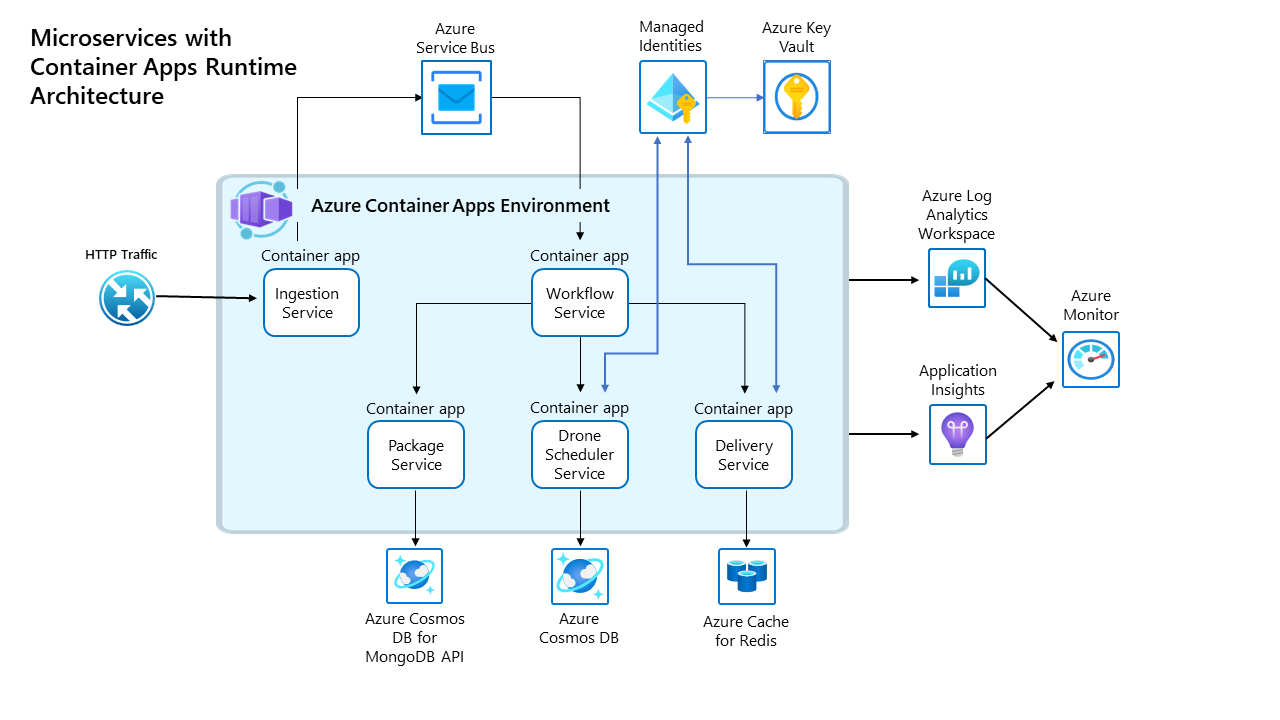
Key Architectural Features
- ✅ HTTPS Ingress - External access to Ingestion service
- ✅ Internal Service Discovery - Services communicate via DNS names (no hardcoded IPs)
- ✅ Secrets Management - Secure configuration via Azure Key Vault
- ✅ Managed Identities - Passwordless authentication to Azure services
Container Apps Features in Action
Feature Implementation Matrix
| Feature | Services Using It | Purpose |
|---|---|---|
| HTTPS Ingress | Ingestion | Expose API to internet securely |
| Internal Discovery | Delivery, DroneScheduler, Package | Service-to-service communication |
| Managed Identities | Delivery, DroneScheduler | Authenticate to Key Vault without secrets |
| Secrets Management | Package, Ingestion, Workflow | Store sensitive configuration |
| Container Registry | All services | Pull Docker images from ACR |
| Revisions | Workflow | Safe deployments with rollback capability |
| ARM Templates | All services | Infrastructure as Code |
| Log Analytics | All services | Centralized logging and monitoring |
Deployment Model
Revision Mode: Single revision (no A/B testing needed)
Scaling: Fixed replicas (1 per service) - no auto-scaling in this example
Sidecars: Not used - each replica = one container
Azure Resources Required
Core Container Apps Resources
| Resource | Quantity | Purpose |
|---|---|---|
| Container Apps Environment | 1 | Shared environment for all microservices |
| Container Apps | 5 | One per microservice (Ingestion, Workflow, Delivery, DroneScheduler, Package) |
| Container Registry | 1 | Store and distribute Docker images |
| Managed Identities | 5 | Secure authentication to Azure services |
| Key Vault | 5 | Secrets storage (2 actively used) |
Supporting Azure Services
| Resource | Quantity | Purpose |
|---|---|---|
| Cosmos DB | 2 | Data persistence for Delivery and Package services |
| Redis Cache | 1 | Track in-flight deliveries (Delivery service) |
| Service Bus | 1 | Asynchronous messaging between services |
| Log Analytics | 1 | Centralized logging and diagnostics |
| Application Insights | 1 | Application performance monitoring |
Networking Resources
| Resource | Purpose |
|---|---|
| Virtual Network | Network isolation |
| Private Endpoint | Secure connections to Azure services |
| Network Interface | Network connectivity |
| Private DNS Zone | Internal name resolution |
Runtime Architecture
How Services Communicate
External → Internal Flow:
- Client → HTTPS → Ingestion Service (public ingress)
- Ingestion → Service Bus Queue → Workflow Service
- Workflow → Internal DNS → Delivery, DroneScheduler, Package
Shared Environment Benefits
All 5 Container Apps share the same environment, enabling:
- ✅ Internal service discovery - Call services by name, not IP
- ✅ Single Log Analytics workspace - One place for all logs
- ✅ Shared secrets management - Centralized configuration
- ✅ Unified networking - Services communicate securely
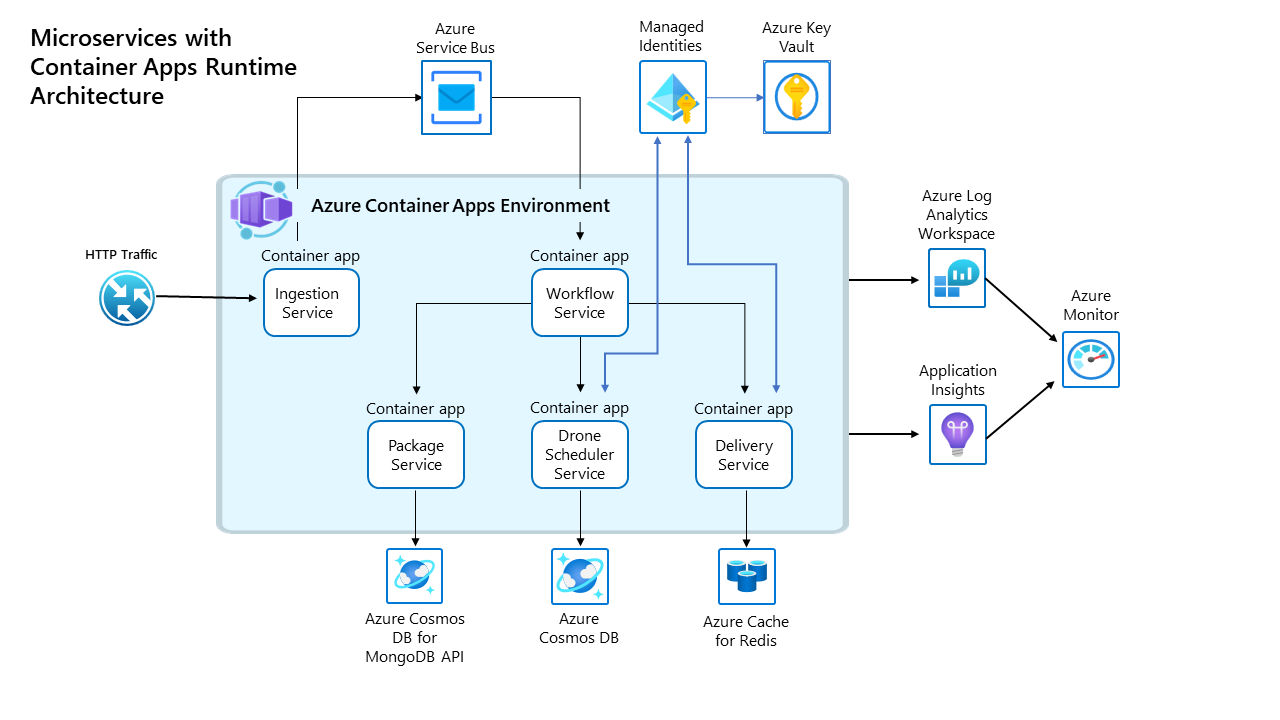
Secrets Management Strategy
Hybrid Approach used for flexibility:
| Services | Authentication Method | Why |
|---|---|---|
| Delivery, DroneScheduler | Managed Identity → Key Vault | No code changes needed |
| Package, Ingestion, Workflow | Container Apps Secrets | Simpler for basic secrets |
Development Environment Requirements
Required Accounts
- ✅ Azure subscription (with appropriate permissions)
- ✅ GitHub account (for source control)
Local Development Tools
| Tool | Purpose |
|---|---|
| Docker Desktop | Build and test containers locally |
| Visual Studio Code | IDE with Docker + Azure extensions |
| Azure CLI | Command-line Azure management |
| PowerShell | Scripting and automation |
Azure CLI Extensions
az extension add --name containerapp
CI/CD Pipeline Resources
Azure DevOps Setup
| Component | Configuration |
|---|---|
| Project | “Project1” |
| Repository | Container app source code |
| Pipeline | “Pipeline1” (Starter template) |
| Build Agent | Self-hosted Windows agent |
Deployment Process
┌──────────────┐     ┌──────────────┐     ┌──────────────┐
│  Code Commit │────▶│ Build Images │────▶│  Push to ACR │
└──────────────┘     └──────────────┘     └──────────────┘
                                                  │
                                                  ▼
                          ┌────────────────────────────────┐
                          │  Deploy to Container Apps      │
                          │  (ARM Templates)               │
                          └────────────────────────────────┘
Key Takeaways
Why This Migration Succeeded
- ✅ Simplified Operations - No Kubernetes cluster management
- ✅ Retained Benefits - Still containerized and cloud-native
- ✅ Cost Reduction - Pay only for actual usage
- ✅ Faster Deployments - Less complex CI/CD
- ✅ Built-in Features - Service discovery, secrets, logging included
When Container Apps Is the Right Choice
This scenario is ideal for Container Apps because:
- ❌ Don’t need Kubernetes API access
- ❌ Don’t need custom service mesh
- ❌ Don’t need complex autoscaling rules
- ✅ Do need microservices communication
- ✅ Do need simplified operations
- ✅ Do need Azure service integration
Lessons Learned
- Start simple - Don’t over-engineer with AKS if Container Apps suffices
- Evaluate usage - Underutilized AKS is expensive
- Leverage managed services - Let Azure handle infrastructure
- Focus on apps - Spend time on business logic, not cluster management